The GTM Leader's Guide to AI Agents: What to Hand Off, What to Keep, and Where to Start

Everyone is talking about agents, and it's getting tougher to know what's real and what isn't.
You've read the headlines. You've sat through a vendor demo or two. And somewhere in the back of your mind, there's a nagging sense that you should be doing something with this.
But then the instinct kicks in: "This sounds technical. Let me loop in product or GTM engineering."
That instinct is going to cost you.
The companies pulling ahead right now are the ones where GTM leaders can detect this problem directly. They're not waiting for a technical team to figure out their workflows. They're learning to break their own work into pieces that agents can handle — and they're proving it works with fast, focused pilots that build internal momentum.
This is about understanding your workflows well enough to know what to hand off, what to keep, and where the leverage actually sits.
I'm going to walk you through how to think about this; the frameworks, the decision filters, and a specific method we use to prove value in 48 hours flat.
What an AI Agent Actually Is (No Engineering Degree Required)
Let's clear up the confusion.
You've used AI tools — ChatGPT, Claude, maybe some purpose-built stuff for sales or marketing. You type something in, you get something out. Useful, but limited. You're still doing the work of feeding it inputs and deciding what to do with outputs.
An AI agent is fundamentally different. An agent doesn't just respond — it acts. It takes a goal, breaks it into steps, executes those steps, and adjusts based on what happens along the way.
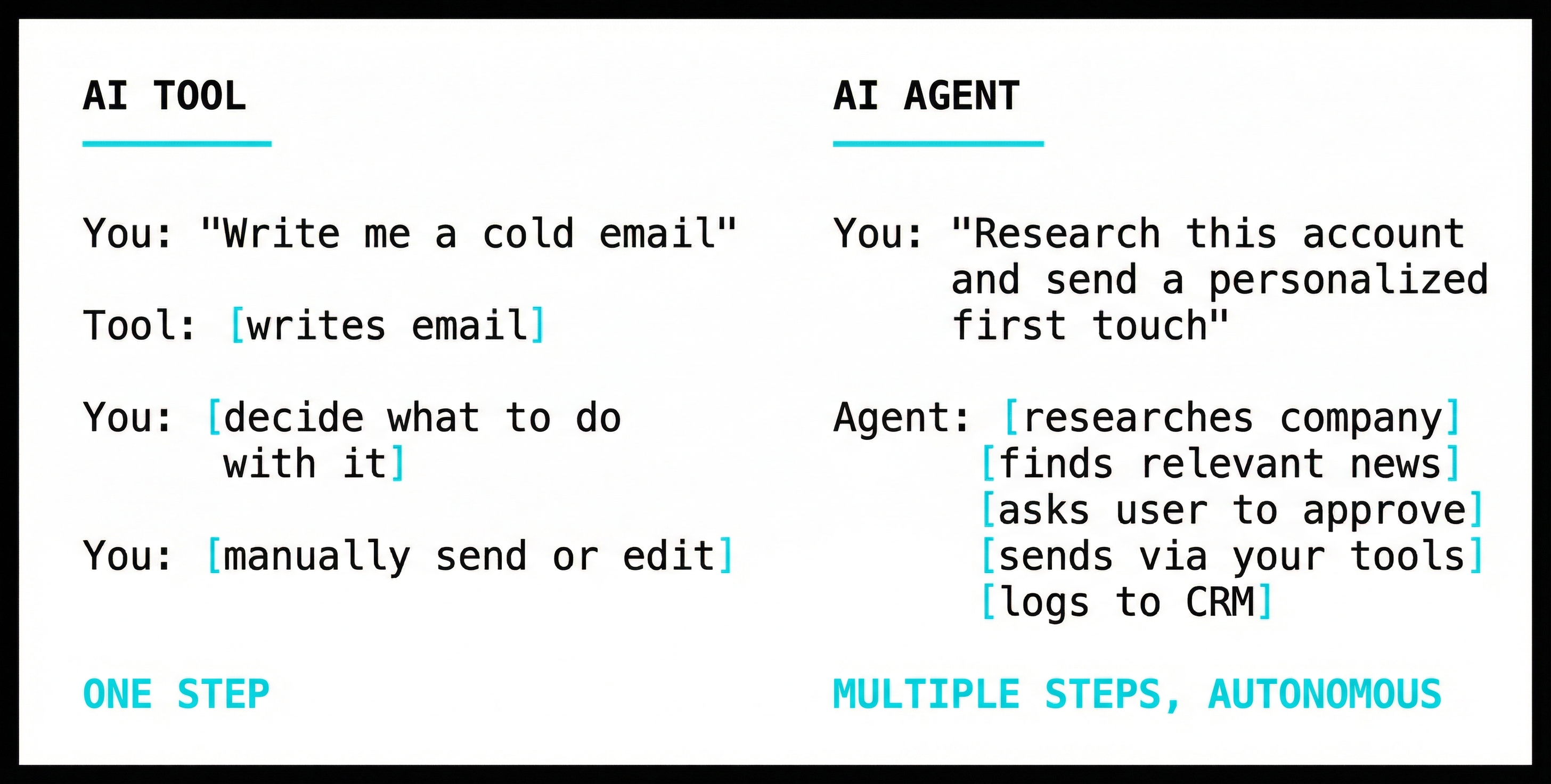
The difference isn't subtle. A tool waits for you. An agent handles the job until it's done.
This is why GTM leaders need to own this. The question isn't "can we build an agent?" The question is "what work should we hand to an agent?" Nobody understands your team's work better than you do. Certainly not engineering.
The Three Types of Work on Your Team
Here's the framework that makes this concrete.
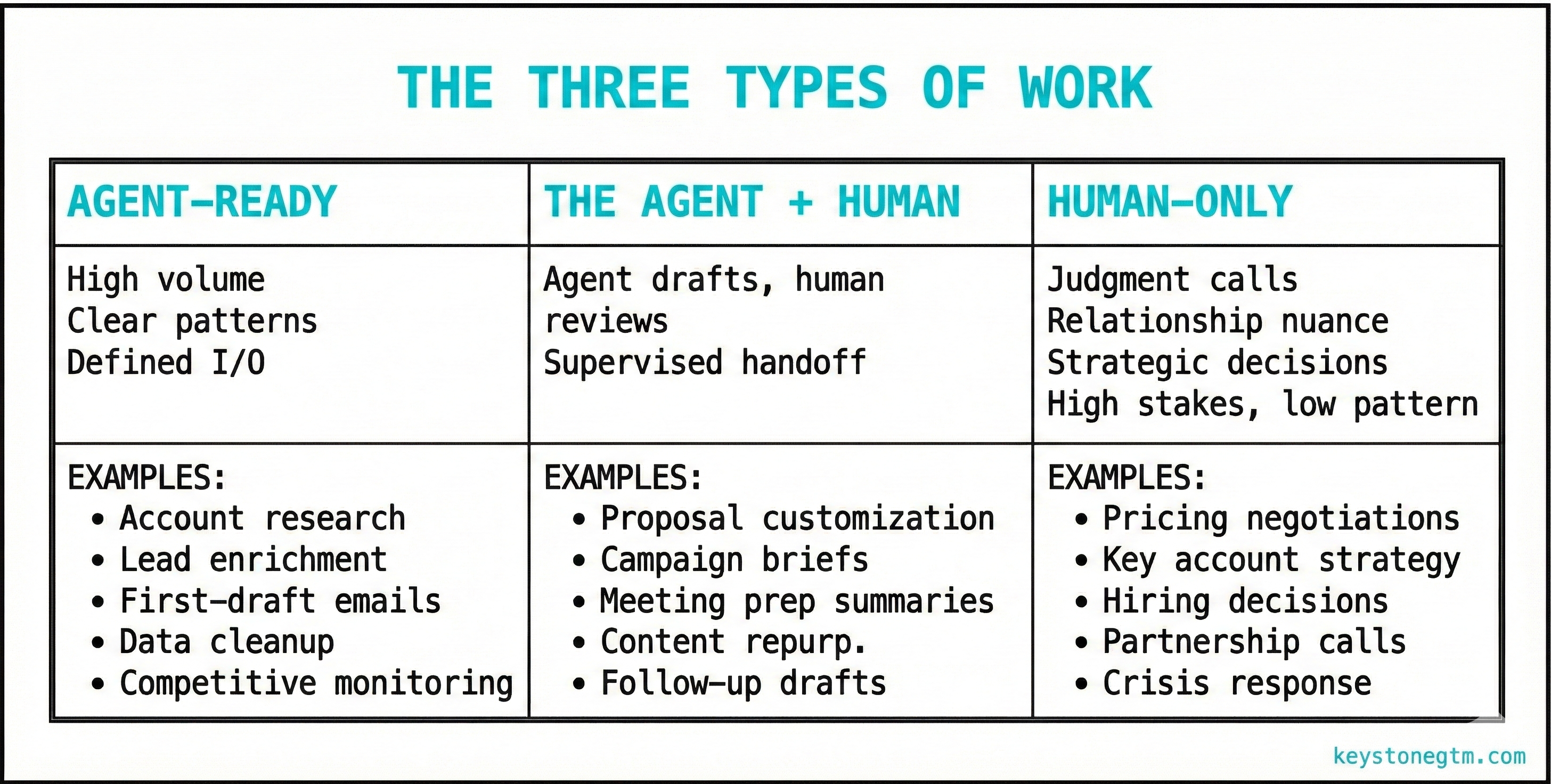
Every task your team does falls into one of three categories. Once you see them, you'll start spotting opportunities everywhere.
Agent-Ready Work
This is where the leverage is highest. High volume, clear patterns, defined inputs and outputs. Your team does these over and over. Each instance varies slightly, but the underlying structure is the same.
Account research is the obvious one. Before every call, someone spends 15-20 minutes pulling together company info, recent news, key stakeholders. It's important — but it's pattern-based. An agent handles this in seconds.
Same with lead enrichment, first-draft outbound emails, data hygiene, competitive monitoring. These aren't trivial tasks. But they follow patterns that agents crush.
Human-Only Work
High stakes, low pattern. Genuine judgment required. The "right" answer depends on context that's hard to articulate, relationships that matter, strategic considerations that shift case by case.
Pricing negotiations. Key account strategy. Deciding whether to walk away from a deal. Reading the room on a partner call.
Don't try to hand this to an agent. You'll get mediocre outputs and lose the human edge that actually wins these moments.
The Agent + Human Zone
This is where most teams should start. Work that benefits from agent involvement but still needs human oversight. The agent does the heavy lifting; you do the final review.
Proposal customization is a good example. An agent pulls together a solid first draft — company details, relevant case studies, customized language. A human reviews before it goes out. The agent handles 80% of the work. You handle the 20% that requires judgment.
Start here. You get the efficiency gains without the risk of fully autonomous mistakes. As you build confidence, you move more work into the agent-ready column.
How to Spot Leverage Points in Your Current Workflows
Knowing the framework is step one. Applying it is step two.
The Weekly Audit
Pick a typical week. Map where time actually goes — not where it should go, where it actually goes. Be honest about this.
Then run each activity through this filter:
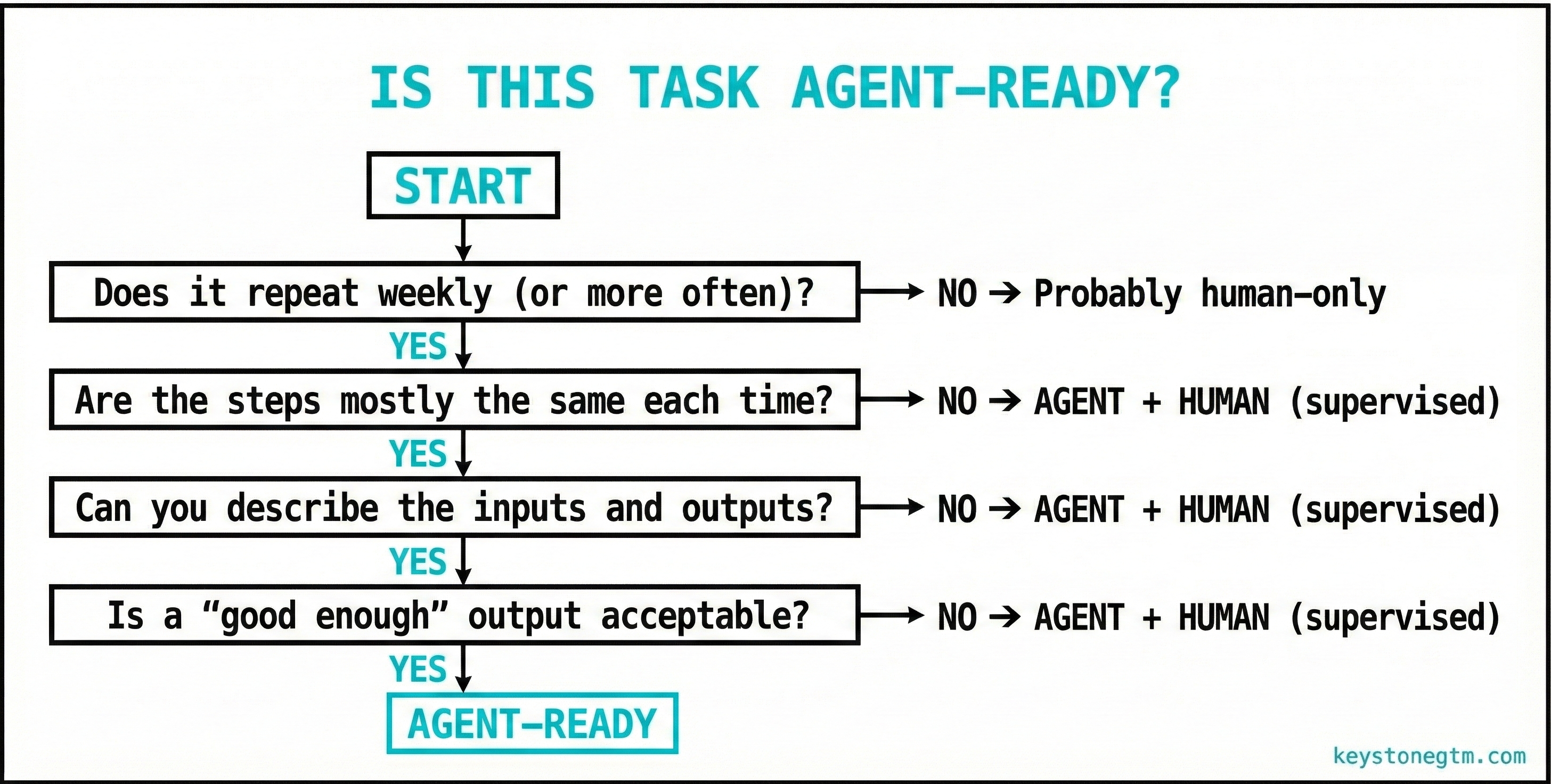
The 80/20: Start Where the Pain Is Highest
If your SDRs spend 3 hours a day on account research before they pick up the phone, that's a flashing red light. If your marketing team manually reformats the same content for different channels, same thing. If your ops person cleans CRM data every Friday afternoon, you already know.
Look for the grind. The repetitive stuff nobody wants to do but everyone agrees matters. That's where agents pay off fastest.
The Difference Between Buying AI Tools and Building AI Fluency
Here's where most teams blow it.
They see the opportunity. They get excited. They go buy a stack of AI tools — an AI SDR, an AI content writer, an AI research tool. Each one promises to solve a specific problem.
Six months later, they've got overlapping subscriptions, bloated tech debt, and a team that still doesn't understand why any of it works (or doesn't).
This is the trap. You're buying tools when you should be building fluency.
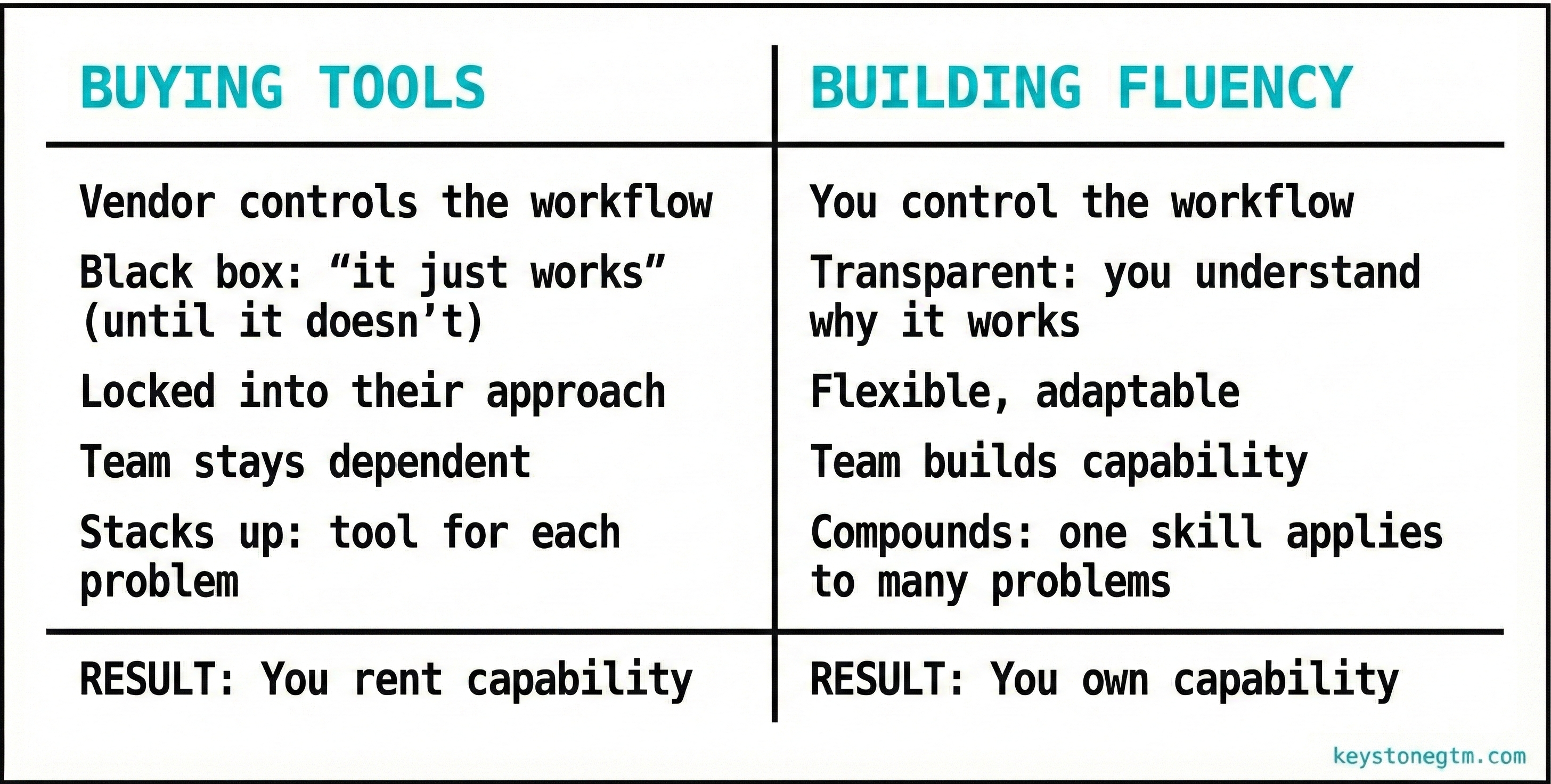
When your team builds fluency, they learn to see workflows differently. They start asking "what can we hand off here?" as a reflex. They understand the principles — what makes a task agent-ready, how to design a handoff, how to evaluate whether an agent is saving time or creating different problems.
This skill compounds. The companies winning with AI aren't the ones with the most subscriptions. They're the ones where the team has developed the capability to identify, design, and deploy agent-powered workflows on their own.
You cannot buy that. You have to build it.
What "AI-Native" Actually Looks Like for a GTM Team
Let me make this concrete.
Here's a before/after for a typical SDR workflow:
Before (Manual)
- Get a list of target accounts
- Research each account manually — LinkedIn, company site, news
- Find the right contact, verify email
- Write a personalized first email
- Send and log to CRM
- Repeat 30-40x per day
Time per account: 15-20 minutes. Output: 30-40 touches per day. Most of the day is research and admin.
After (Agent-Assisted)
- Define ICP and target criteria
- Agent pulls accounts, enriches data, identifies contacts
- Agent drafts personalized first touches based on research
- SDR reviews, edits where needed, approves send
- Agent sends and logs to CRM
- SDR focuses on responses, calls, relationship-building
Time per account: 2-3 minutes of review. Output: 100+ touches per day, higher quality. Most of the day is actual selling.
The role didn't disappear. It shifted. The SDR is still essential — but they're doing work that requires a human, not work that just happens to be done by one.
That's what "AI-native" means. Not replacing people. Restructuring work so people do what they're best at.
What Separates the Companies Figuring This Out
The gap between companies moving on this and companies waiting is widening fast.
Here's what I've noticed about the ones pulling ahead:
They don't wait for permission. They're not asking engineering to build something. They're not waiting for a company-wide AI initiative. They're running pilots within their own team, learning fast, iterating.
They start messy and small. They don't try to "transform" everything at once. They pick one workflow — often the ugliest, most repetitive one — and run a focused experiment.
They measure differently. Not just "did this save time?" but "did this free up capacity for higher-value work?" and "is my team learning how to do this themselves?"
GTM leaders own the problem. In these companies, the VP of Sales or Marketing isn't delegating AI to someone else. They're personally in the workflows, designing the handoffs, evaluating results.
The companies falling behind are doing the opposite. Waiting for IT. Buying tools without building fluency. Treating this as someone else's job.
The gap is compounding. Every month you wait, the winners get further ahead.
The 2-Day Agent Sprint: How to Prove This Works in 48 Hours
Most pilot programs fail because they're too diffuse. You try to get everyone on board at once, nobody really owns it, and the whole thing fizzles after a few weeks of half-hearted adoption.
We do it differently. We call it the 2-Day Agent Sprint.
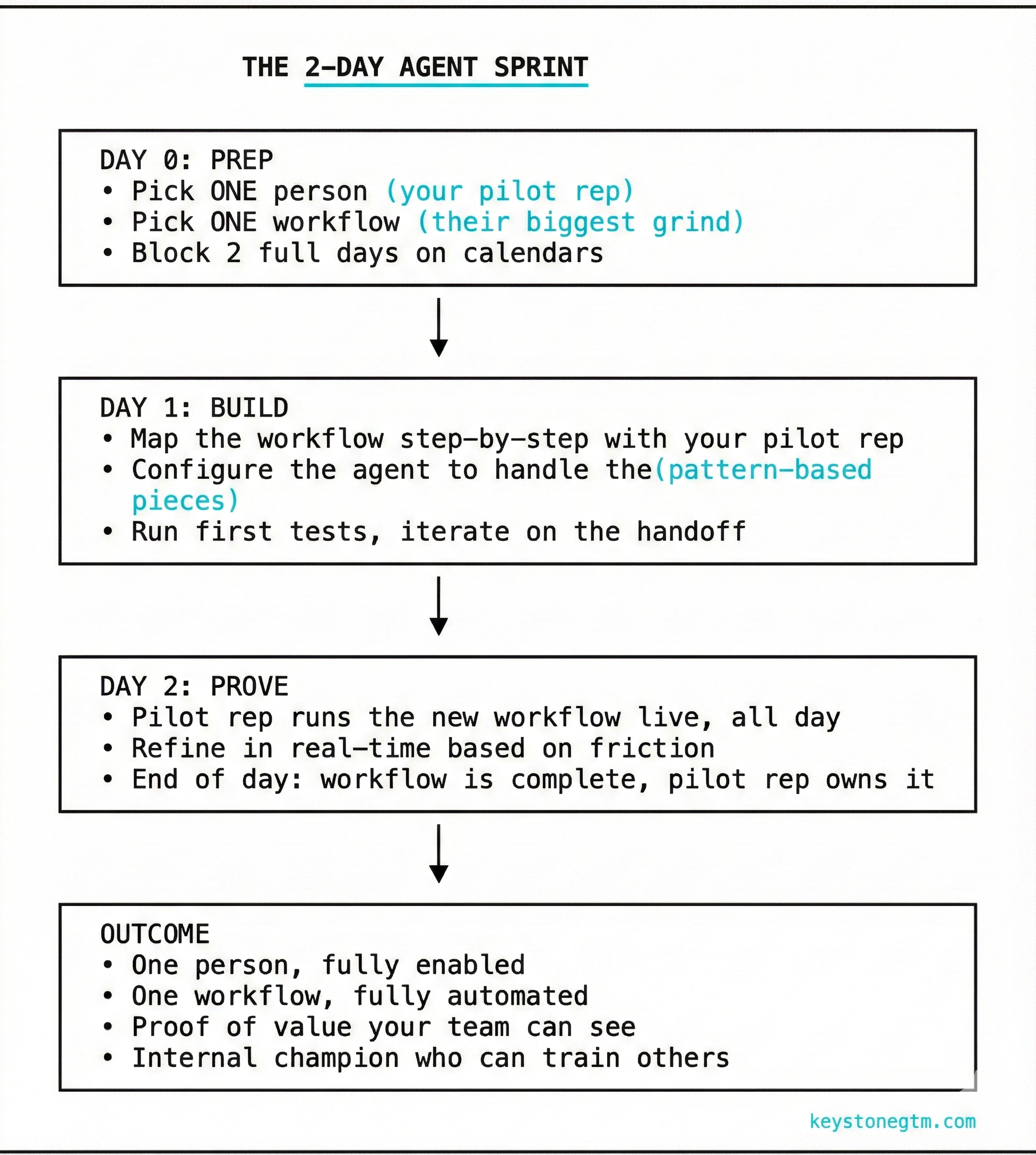
Why This Works
One person, not ten. You're not trying to change everyone's behavior at once. You're getting one person to a complete, working state. That person becomes your proof point and your internal champion.
Two days, not two months. Speed matters. The longer a pilot drags on, the more likely it stalls. Compressing it into 48 hours forces focus and creates momentum.
Complete, not partial. At the end of Day 2, the workflow is done. Not "in progress." Not "we're still figuring it out." Done. The pilot rep can run it on their own, with full control.
Visible wins. When the rest of the team sees one person shipping 3x the output with less grind, they want in. That's how adoption spreads — not through mandates, but through proof.
The biggest mistake I see: trying to roll out AI to the whole team before you've proven it works for anyone. The 2-Day Agent Sprint fixes that. One person, one workflow, 48 hours. Then you scale what works.
Where We Come In
This is what we do at KeystoneGTM.
We help GTM leaders build AI fluency without diluting focus on real outcomes. We work with your team to identify the high-leverage workflows, run the 2-Day Agent Sprint to prove value fast, and build internal capability that lasts.
Combine this with weekly sessions to enable adoption, and progress becomes real.
Unlike build-transfer models where you're left with an expensive knowledge transfer, you can downgrade to a $300/mo support plan at any time to ensure ongoing support.
If you're a GTM leader who knows you need to move on this, let's talk. We'll help you find the starting point and run the first sprint.
You don't need to figure this out alone.